Pivot / Unpivot
Reshape a table between long and wide form, the way a spreadsheet pivot table does. Open it via Analyse -> Pivot / Unpivot....
The result always opens in a new detached tab, so your original table is never modified. It runs on the table as you currently see it, including any unsaved edits.
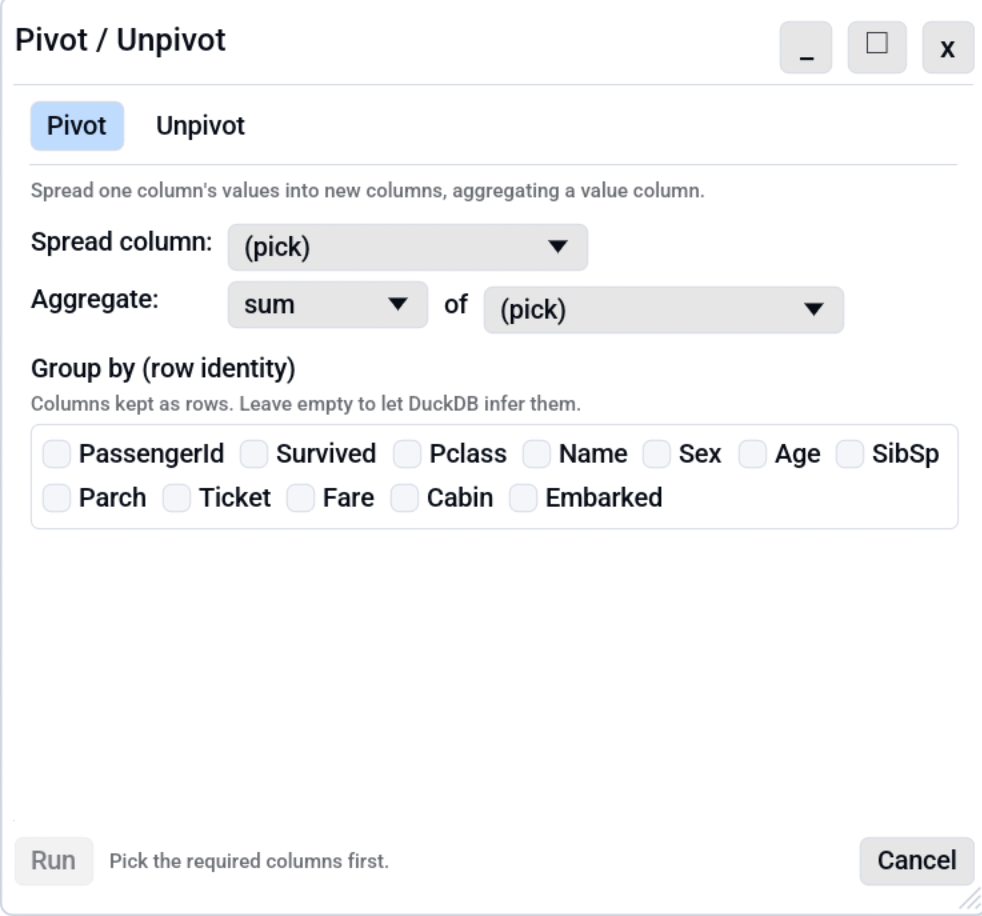
Pivot (long to wide)
Pivot spreads one column's distinct values into new columns:
| Field | Meaning |
|---|---|
| Spread column | The column whose values become the new column headers (e.g. month). |
| Aggregate | How to combine values landing in each new cell: sum, count, avg, min, max. |
| of | The value column being aggregated (e.g. sales). |
| Group by | The identity columns kept as rows (e.g. region). Empty = every remaining column. |
Example. Spread month, aggregate sum of sales, group by
region turns a long sales log into a region-by-month grid of totals.
Unpivot (wide to long)
Unpivot is the reverse: it melts several columns into a name/value pair. Pick the columns to unpivot (at least two), then name the generated name column and value column.
Example. A wide region, jan, feb, mar table becomes a long
region, name, value table with one row per region-month.
Live preview
While the dialog is open it shows, underneath the options:
- a one-line plain-language description of what the current settings do
(for example "Spreads the distinct values of
monthinto new columns, using sum ofsales, grouped byregion."), and - a small preview table of the first few result rows.
So you can see the shape of the result before committing. To stay fast on large tables the preview runs against a sample of the first 1,000 source rows and shows at most 10 result rows; press Run to reshape the full table into a new tab.
How it works
Both modes build a DuckDB
PIVOT / UNPIVOT
statement and run it against the active table (exposed to DuckDB as
the table data, the same as the SQL panel). Because the
output is a detached tab with no source path, Save as prompts for
a new file and the original is safe.
On a live database
On a database tab that holds only part of its table, Pivot runs on the database and Unpivot on the loaded rows; see Analyses on live databases.
Command line and MCP
The same job without the GUI:
- MCP:
pivot