File Internals
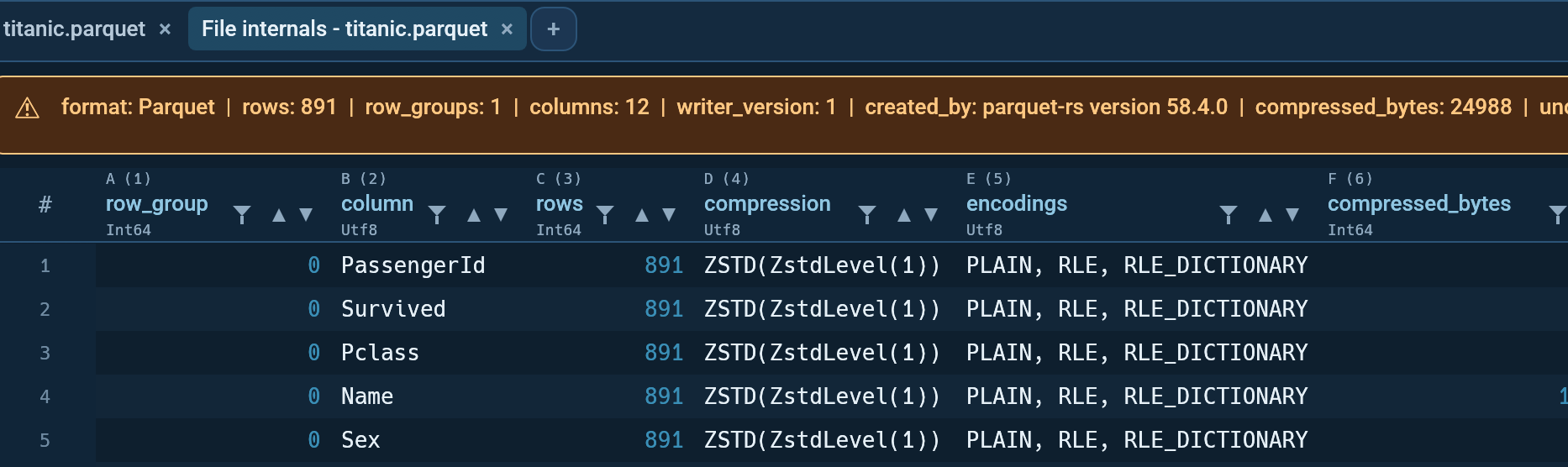
Analyse → File internals... opens a read-only tab describing how the active file is physically written, as opposed to what is in it.
Summary and --describe answer "what does this file
contain". This answers the other question: why is it four gigabytes, and
why does every query over it crawl.
What you get
A one-line strip above the grid carries the file-level facts:
format: Parquet | rows: 4,200,000 | row_groups: 12 | columns: 34 |
writer_version: 2 | created_by: parquet-cpp-arrow version 15.0.0 |
compressed_bytes: 812,004,221 | uncompressed_bytes: 3,104,882,190 |
bloom_filters: 0 | file_size_bytes: 812,220,004
The grid below it has one row per column per row group:
| Column | Meaning |
|---|---|
row_group |
Zero-based row-group index |
column |
Column path inside the file |
rows |
Rows in that row group |
compression |
Codec for that column chunk (SNAPPY, ZSTD, ...) |
encodings |
Encodings used (PLAIN, RLE_DICTIONARY, ...) |
compressed_bytes |
Size of the chunk on disk |
uncompressed_bytes |
Size once decoded |
nulls |
Null count from the chunk's statistics, empty if absent |
min / max |
Column statistics, which are what let a reader skip a group |
Sorting the grid by compressed_bytes is usually the fastest way to
find the column that is costing you the space.
Hints
Octa adds up to three plain-language warnings when the layout looks poor. They are heuristics, not verdicts:
- Very small row groups. Thousands of tiny groups, the classic output of streaming ingest. Readers pay per-group overhead, so the file scans slowly. Rewriting with a larger row-group size helps.
- No column statistics. Without min/max values a query engine cannot skip row groups, so every read touches the whole file.
- No compression. Rewriting with zstd or snappy usually shrinks the file substantially at little read cost.
You can act on all three from Octa itself: see the write options in Saving and Batch Convert.
Format support
Parquet reports the full detail above. Other formats report their size and state that they expose no inspectable internal structure, which is an answer rather than an error. A tab with no file behind it (an unsaved table, a query result) has nothing to inspect and says so in the status bar.
Command line and MCP
The same information is available without the GUI:
- CLI:
octa --describe FILE --deep, facts askey<tab>valuelines then the chunk table, hints on stderr. - MCP:
describe_filewithdeep: true, which adds aninternalsobject carryingfactsandhints.