Compare View
Side-by-side comparison of two files. Four sub-modes: Text Diff for git-style line-by-line diffs, Row Hash Diff for column-aware set comparison, Ordered for positional row-by-row cell diffs, and Join (by key) for matching rows by a key column and reporting what changed. All work across formats, so you can compare a CSV to a Parquet.

Three ways to start a comparison
- From the View menu: View → Compare with… opens a file picker. The active tab is the left side; the picked file is the right side.
- Right-click a tab in the tab strip → Compare with active tab. The right-clicked tab becomes the right side.
- Ctrl-click exactly one non-active tab to add it to the multi-selection, then press the Compare selected tabs shortcut (default F9, remappable). With one tab in the selection set, that tab becomes the right side.
The active tab is always the left side; the picked file or tab is always right.
Sub-mode toggle
The Compare view's toolbar has a Text Diff / Row Hash Diff / Ordered / Join (by key) radio:
- Text Diff uses the
similarcrate to compute a line-by-line LCS diff over the raw text content. Rendered side-by-side with+/-markers in the gutter, additions in green, removals in red. - Row Hash Diff hashes each row's selected columns with
BLAKE3 (fast, stable across runs) and bucketed the rows into
Left-only, Right-only, Shared. Cross-format works
because hashing sees only
CellValue::to_stringoutput. - Ordered compares rows by position: row N on the left versus row N on the right, naming the differing columns. See Ordered below.
- Join (by key) matches rows by the key column(s) you pick and reports added / removed / changed rows. See Join below.
The default sub-mode picks itself based on inputs:
- If both sides have raw text, defaults to Text Diff.
- Otherwise (binary formats), defaults to Row Hash Diff.
Text Diff
- Two panes: left = active tab's text, right = picked file's text.
- Line numbers in the gutter for both sides.
- Diff markers in a centre gutter:
+for a line added on the right.-for a line removed (present on the left only).- blank for unchanged.
- A 500 ms timeout kicks in against pathological inputs (the diff algorithm has O(n²) worst-case). If the diff doesn't complete in time, Octa shows a "diff too complex" banner with a fallback to "first 100 lines of each."
Editing the left pane
The left pane is the file you have open, so it is a real editor: type in it and the tab changes exactly as if you had edited it in Raw text. Ctrl+S saves, the tab shows the usual unsaved marker, and the diff re-computes as you type, so the markers follow the edit line by line. This is the point of the view: read what changed against the committed version and fix it without leaving the comparison.
The right pane is a committed revision or a second file. There is nothing to write back to, so it stays read-only: you can select, scroll and copy, and keystrokes do nothing.
It is the same editor as Raw text: Tab indents in place by the Tab size setting instead of jumping to the next control, and dragging a selection past the edge of the pane scrolls it. Only the tab you type becomes spaces; tabs the file already contained are left alone.
Two details worth knowing:
- The left pane carries blank filler rows wherever the right side has a line of its own, so the two stay aligned while you read. They are not part of your file. Type on one and it becomes a real line; leave it alone and it never reaches the file.
- The pane is read-only whenever the tab is, which covers read-only mode (F8), a large-file tab and a database tab without write access. Hovering Left: in the toolbar says which of the two applies.
Row Hash Diff
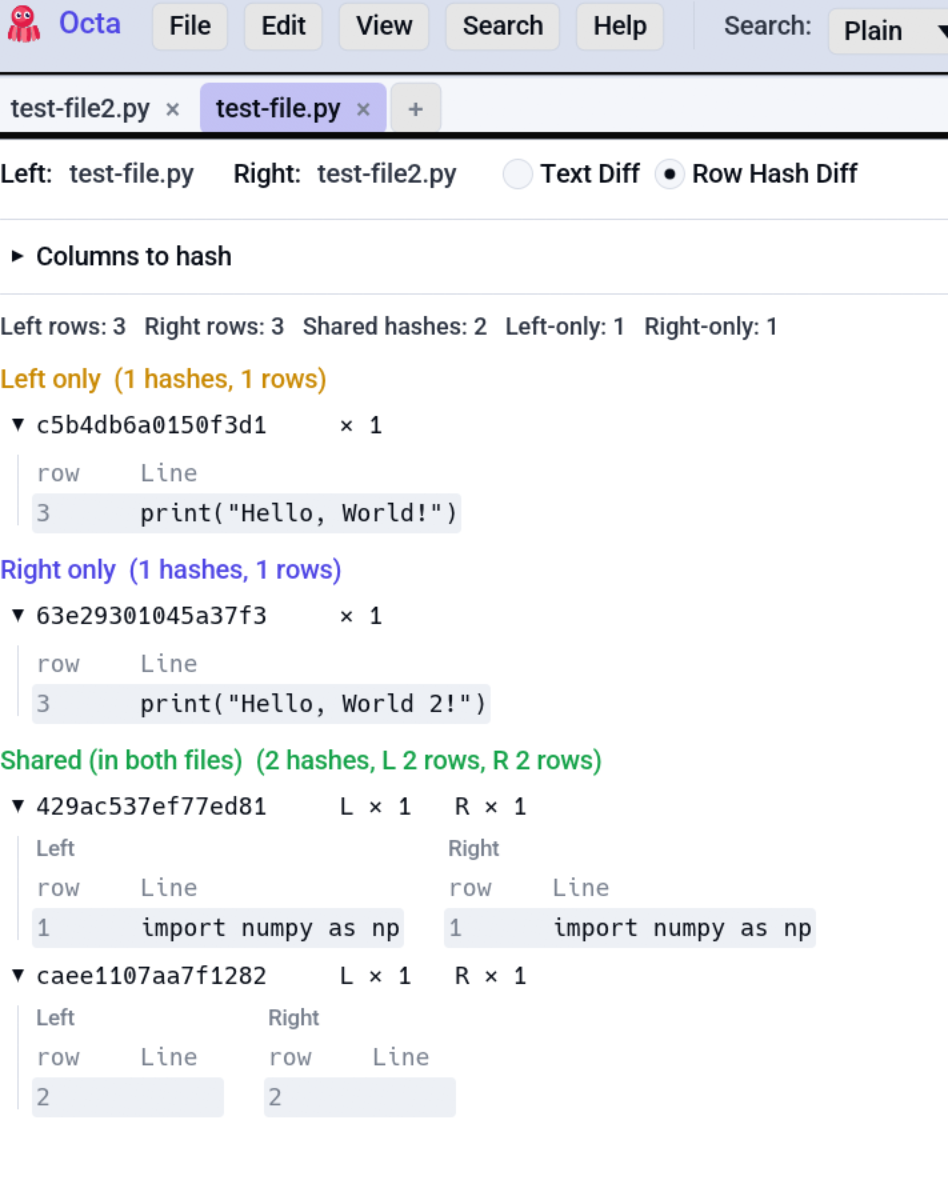
Works best for tables, but also for text files.
Picking columns
Above the diff panes, a column picker lists every column from each side. Check the boxes for the columns that should participate in the hash. Common patterns:
- Match by primary key: check just
idon both sides. Rows with the sameidbecome candidates for the Shared bucket; rows withidvalues not on the other side become Left-only or Right-only. - Match every column: leave all unchecked. The hash defaults to hashing every column on both sides; rows match only if every cell agrees.
- Match by composite: check
customer_id+order_dateto match orders.
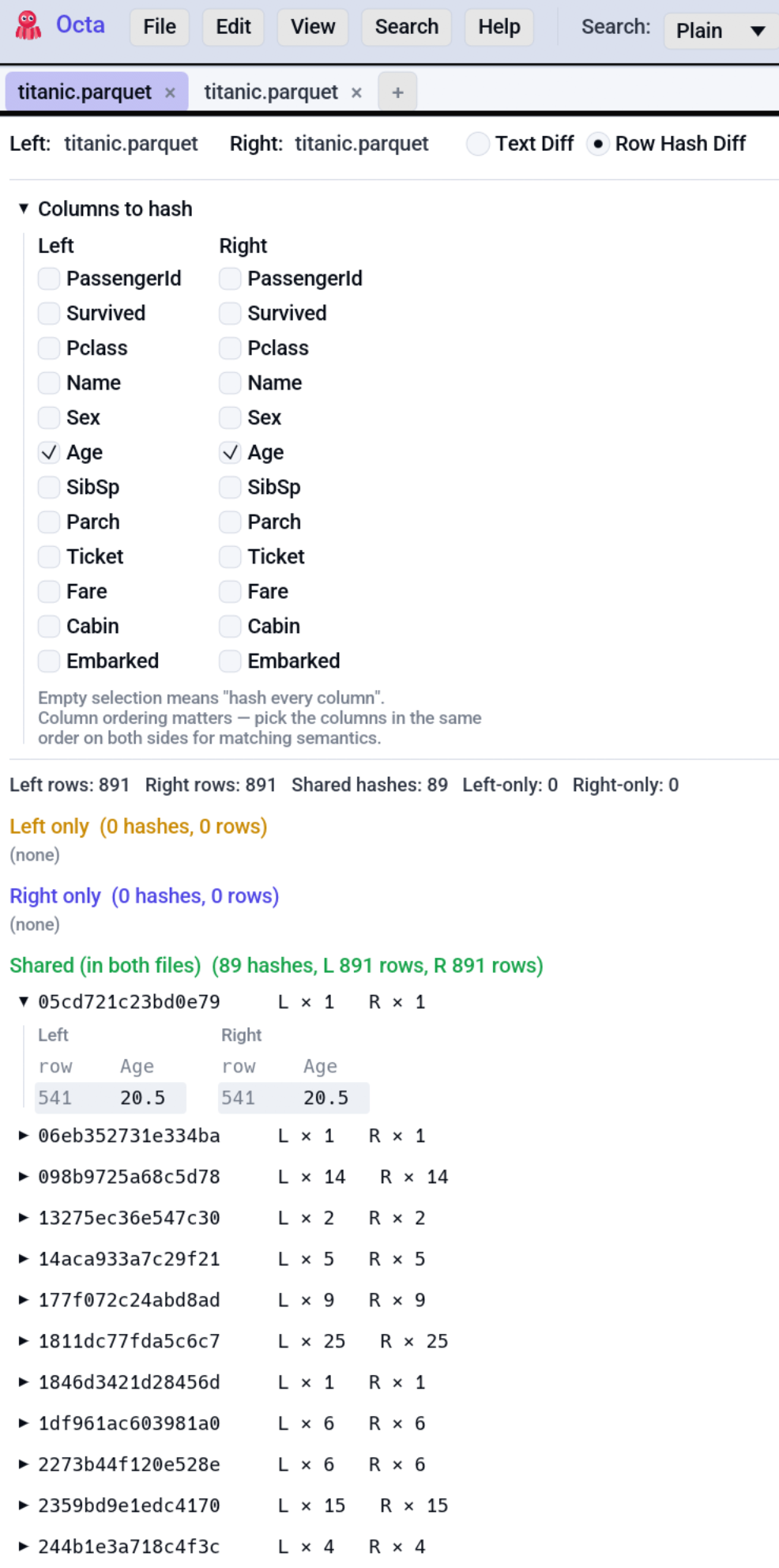
The picker shows columns from both sides, so you can pair the same
logical column even if the names differ (user_id on the left,
uid on the right).
Buckets
Once you've picked columns, the diff renders three collapsible sections:
| Bucket | Meaning |
|---|---|
| Left-only | Rows whose hash appears only on the left side. |
| Right-only | Rows whose hash appears only on the right side. |
| Shared | Rows whose hash appears on both sides (potential matches). |
Each bucket can be expanded to show the actual row content. The display is capped at 50 rows per bucket to keep rendering snappy on million-row diffs; the bucket count remains accurate.
Empty column selection
If you start with no columns selected, the diff hashes every column on both sides, but the bucket display narrows to showing the first 8 columns to keep the grid readable.
Ordered
Compares the two tables positionally: row 1 against row 1, row 2 against row 2, and so on, over the columns the two tables share. For each row it names exactly which columns differ. Rows past the end of the shorter table are reported as existing on one side only.
Use Ordered when the two files are already in the same order (for example two exports of the same query taken at different times) and you want a precise cell-level diff rather than set membership.
The result is one table with a status column (changed_a /
changed_b for the two halves of a changed pair, only_in_a /
only_in_b for unmatched trailing rows), a changed_columns column
listing the differing column names, and the data columns. A changed row
appears as two adjacent rows so the before/after sit together.
Join (by key)
Matches rows by one or more key columns instead of by position.
Tick the key column(s) in the Key columns panel (for example an
id column); Octa pairs each left row with the right row that has the
same key, then reports:
- rows present only on the left (
only_in_a), - rows present only on the right (
only_in_b), - rows that matched but whose other columns differ (
changed_a/changed_b), with the differing column names in changed_columns.
The same key column name must exist on both sides; a missing key column raises an inline warning. Non-key columns are compared by name, so column order may differ between the two files.
Use Join when you care about "the same record, what changed?" and the two files are not necessarily in the same row order.
The Ordered and Join modes run the same logic as the
command-line octa --diff and the assistant's diff_tables tool, so the
GUI, CLI, and MCP always agree.
Tolerance
Open Tolerance above the result to count values as the same when they are close enough, or to leave columns out of the comparison.
- Numbers within: two numbers count as the same when they differ by at
most the absolute amount you type (for example
0.01), or by at most the percentage you type of the larger one. Either is enough. Both decimal marks work. Empty means exact. - Times within: dates and times count as the same when they are at most this many seconds apart. A date counts as midnight.
- Ignore upper/lower case and Ignore extra spaces: text compares without regard to case, or with spaces at the ends removed and runs of spaces counted as one. These also apply when rows are matched on the key columns.
- Leave out these columns: ticked columns are not compared, but they still appear in the result.
Tolerance never pairs keys: a number tolerance does not make key 1.0 match
key 1.001. When some cells differ only within tolerance, the summary adds
"N cells differ only within tolerance". It applies to Ordered and Join, and not to
Row Hash Diff, which matches rows by fingerprint and cannot be "roughly equal".
When to use which sub-mode
| Scenario | Mode |
|---|---|
| Diff two text files (Markdown, JSON, source code) | Text Diff |
Diff two notebooks (.ipynb) |
Text Diff (after switching to Raw view) |
| Find rows that exist in CSV A but not in CSV B | Row Hash Diff |
| Compare a CSV against a SQLite export | Row Hash Diff (cross-format) |
| Check whether two Parquet files have the same data | Row Hash Diff |
| Two same-ordered exports, see which cells changed | Ordered |
Same records by id, see what each record's fields changed to |
Join (by key) |
Compare with a git version
If the active file lives inside a git repository, View → Compare with git version... compares your current working copy (including any uncommitted changes) against a committed version.
The dialog opens on HEAD (the last commit) and offers a dropdown of the recent commits that touched this file, so you can compare against any older revision without typing a SHA. Two buttons:
- Compare loads the chosen committed version as the right side and switches to Compare view (using whichever sub-mode fits, just like a normal compare).
- Open in new tab loads that past version on its own, so you can browse or query it directly instead of diffing.
It works for any tracked file, text or binary: the committed bytes are read
straight from git (git show <rev>:<file>) into a temporary file, so Parquet,
Excel, and the like compare just as well as CSV. If the file is not saved
inside a git repository, a status-bar message says so and no dialog opens.
Copying from a diff
In Text Diff you can select text directly: drag to mark, double-click a word, or triple-click a line, then copy with Ctrl+C or right-click Copy selection. The right-click menu also offers Copy left side, Copy right side, and Copy as unified diff for the whole comparison. Long lines scroll sideways within each pane instead of wrapping, so line numbers stay aligned.
Row Hash Diff, Ordered, and Join offer Copy table (Ctrl+C or right-click) for the visible result.
Limitations
- Two-way only. No three-way merge / compare.
- No edit mode. Compare view is display-only; to fix discrepancies, switch back to Table view and edit there.
- No JSON Patch / semantic diff. Text Diff treats files as text; differences in whitespace or key order surface as diffs even when the semantics match.
Command line and MCP
The same job without the GUI:
- Command line:
octa --diff - MCP:
diff_tables
See also
- Tabs & Folder Sidebar covers Ctrl-click multi-selection used by the F9 shortcut.
- Settings → Shortcuts is where to rebind F9 / Compare-selected-tabs.