Date Inference
With Settings > File-Specific > Detect dates on load switched on,
when Octa opens a text-shaped tabular file (CSV, TSV, JSON, JSONL,
Excel, XML, TOML, YAML, Markdown, DBF), it scans every string
column for a uniform date layout. If every non-null value in a
column matches the same date pattern, the column is silently
promoted from Utf8 to Date32 (or Timestamp if a time
component is present).
The result: dates display as proper dates in the Table view,
sort chronologically, work with SQL DATE functions, and round-trip
losslessly into binary formats like Parquet.
This page documents which patterns are detected and what happens
when a column is ambiguous (e.g. 02/03/2024 could be either
DD/MM or MM/DD).
Off by default, and never in the way
Nothing looks for dates unless you ask: with the setting off (the default), date columns stay text, and so does a column retyped by Use as header. Ticking the setting asks first and says what it costs.
When it does run, it runs in the background, on the same thread that reads a large file, so the window keeps responding. A column is decided on its first thousand values: a column of product names is ruled out at once and never read in full. Only columns that look like dates are read to the end, and every value of those is checked, which on five million rows costs about three seconds per date column.
Big files opened the ordinary way puts this beside the other settings that cost time on large files.
To get dates without the setting, use Columns -> Detect dates (the same check, on the open table, in the background, undone by one Ctrl+Z) or convert one column with Change type.
Why text-formats only
Binary formats (Parquet, Arrow, SQLite, DuckDB, SAS, Stata, SPSS, RDS, ORC, Avro, HDF5, GeoPackage) already carry typed date columns from disk, so Octa preserves the source typing without inference. Running inference over them would re-process already-typed data and risk corrupting it.
The text formats that do get the inference pass:
- CSV, TSV
- JSON, JSON Lines
- Excel (
.xlsx, since strings come back fromcalamineasUtf8) - XML, TOML, YAML
- Markdown table content
- DBF
Recognised date layouts
Seven date layouts are tried per column. Octa accepts a column only when every non-null cell matches the same one.
| Layout | Example | Notes |
|---|---|---|
YYYY-MM-DD |
2024-01-15 |
ISO 8601. Canonical, with no warning when promoted. |
YYYY/MM/DD |
2024/01/15 |
ISO order, slash separator. |
DD.MM.YYYY |
15.01.2024 |
European, dot separator. |
DD-MM-YYYY |
15-01-2024 |
European, dash. |
DD/MM/YYYY |
15/01/2024 |
European, slash. |
MM-DD-YYYY |
01-15-2024 |
US, dash. |
MM/DD/YYYY |
01/15/2024 |
US, slash. |
Two-digit years (e.g. 15.01.24) are not recognised yet. Files with two-digit years
stay as Utf8; you can fix in another tool or use SQL strptime()
to convert.
Recognised datetime layouts
When the column has a time component, seven datetime layouts are tried, five naive and two timezone-aware:
| Layout | Example | Notes |
|---|---|---|
YYYY-MM-DD HH:MM[:SS] |
2024-01-15 14:30:00 |
Canonical naive form. |
YYYY-MM-DDTHH:MM[:SS] |
2024-01-15T14:30:00 |
ISO 8601 with T, naive. |
DD.MM.YYYY HH:MM[:SS] |
15.01.2024 14:30:00 |
European, dot. |
DD/MM/YYYY HH:MM[:SS] |
15/01/2024 14:30:00 |
European, slash. |
MM/DD/YYYY HH:MM[:SS] |
01/15/2024 14:30:00 |
US, slash. |
YYYY-MM-DD HH:MM[:SS]<tz> |
2024-01-15 14:30:00+02:00 |
ISO with space + offset → normalized to UTC. |
YYYY-MM-DDTHH:MM[:SS]<tz> |
2024-01-15T14:30:00Z |
ISO with T + offset → normalized to UTC. |
Seconds are optional, so 2024-01-15 14:30 parses too.
Fractional seconds
Fractional seconds (milli / micro / nano) are accepted on every
datetime layout and preserved verbatim in the canonical display.
A column of 2024-01-15 14:30:00.123456 round-trips as
2024-01-15 14:30:00.123456. Mixed precision within the same column
is fine, each cell keeps the precision it was parsed with;
whole-second rows still render as 2024-01-15 14:30:00 (no trailing
dot). The underlying type is Timestamp(Microsecond, None), so the
fraction also survives a re-export to Parquet / SQLite / DuckDB.
Timezone offsets
Both Z (UTC) and explicit offsets (+02:00, -05:00, the compact
+0200, etc.) are recognised on the two ISO datetime layouts. Every
value is shifted to UTC before being stored, so the cell shows the
UTC wall-clock time without an explicit suffix, since the underlying
Timestamp(Microsecond, None) cell type has no slot to preserve the
original offset. Examples (mixed-offset column, all normalized):
| Source | Stored / displayed |
|---|---|
2024-01-15T14:30:00Z |
2024-01-15 14:30:00 |
2024-01-15T14:30:00+02:00 |
2024-01-15 12:30:00 |
2024-01-15T09:00:00-05:00 |
2024-01-15 14:00:00 |
2024-01-15T14:30:00.123Z |
2024-01-15 14:30:00.123 |
Because the column is normalized to UTC, the format-changed banner fires (offset stripped, wall-clock time shifted) so you can see the transformation at a glance.
Binary formats that carry a zone
The above is about text formats, where the offset lives in the value
and has nowhere to go. Parquet, Arrow IPC and ORC are different: the
timezone sits on the column type, not in the value, and Octa keeps
it. A column typed Timestamp(µs, "Europe/Brussels") shows its values on
the Brussels clock, which is the zone the column header names. A daylight
change is followed properly, so the same column reads UTC+2 in June and
UTC+1 in January.
Saving converts back out of that zone and writes the timezone into the file again, so a read-and-save round trip moves neither the clock nor the zone. A column with no zone on its type is left exactly as it is: nothing shifts it into the machine's local time.
Octa reads either spelling the format allows, an IANA name
(Europe/Brussels) or a fixed offset (+02:00). A zone string it cannot
parse is shown in UTC rather than guessed at, since a wrong hour is worse
than an unconverted one.
DuckDB TIMESTAMPTZ
DuckDB is the same idea with the zone in a different place. A
TIMESTAMPTZ is a UTC instant, and the wall clock it is shown on comes
from the connection's TimeZone setting, which defaults to the machine's
own zone. Octa asks DuckDB for that setting and shows the column on the
same clock the DuckDB CLI would, with the zone in the column header
(Timestamp(Microsecond, Some("Europe/Berlin"))). A plain TIMESTAMP
has no zone and is never shifted.
Editing works on that clock too: type 18:15 into a TIMESTAMPTZ cell
and the instant stored is 18:15 in the column's zone. The value is
written back with an explicit +00:00 offset rather than as a bare wall
clock, so the stored instant does not depend on which timezone the
connection happens to have applied at that moment.
This covers DuckDB files, Delta and Iceberg tables, the large-file mode and the SQL panel's own results, since all four read through DuckDB.
A column that mixes naive (2024-01-15T14:30:00) and tz-aware
(2024-01-15T14:30:00Z) values stays as Utf8, because those are two
semantically different things and inference refuses to silently
collapse them. Pick one in source data, or pre-process with
SQL.
Three-letter zone abbreviations (PST, CEST, …) are not
recognised: they're ambiguous (e.g. IST means India or Israel
depending on context). Convert with strptime in SQL if you need
those.
How inference decides
For each candidate layout, Octa attempts to parse every non-null value in the column:
- No matches: discard that layout for this column.
- Some match, some fail: discard that layout (Octa won't promote a column that's mostly dates but has stragglers).
- All match: keep that layout as a candidate.
After all candidates have been tested:
- Zero candidates → column stays
Utf8. - One candidate → column is promoted to
Date32/Timestampusing that layout. - Multiple candidates → ambiguity. See below.
The pruning works naturally because chrono::NaiveDate::parse_from_str
rejects out-of-range months / days. A single value like 13/04/2024
already eliminates MM/DD/YYYY (month > 12), so any column
containing it can only be DD/MM/YYYY, no dialog needed.
Columns that only contain values with months ≤ 12 and days ≤ 12 (e.g. all dates in the first 12 days of a month) are the genuinely-ambiguous cases.
The ambiguity dialog
When a column is consistent with multiple layouts (typically
DD/MM/YYYY and MM/DD/YYYY both pass), Octa shows a modal:
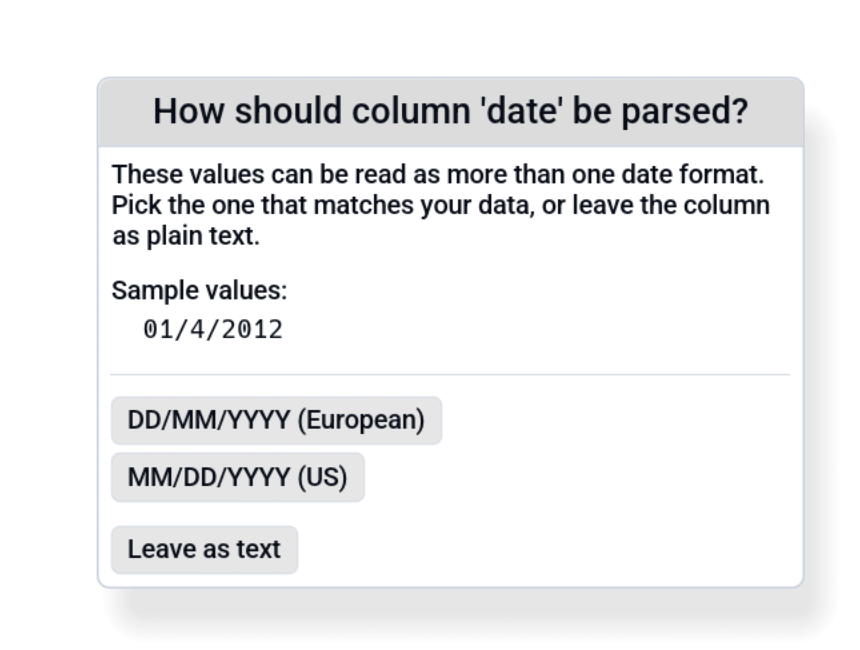
You pick:
- European: promote using DD/MM/YYYY.
- US: promote using MM/DD/YYYY.
- Leave as text: keep the column as
Utf8, no promotion.
The dialog shows a few sample values from the column so you have context. By default the choice applies only to that column, and other ambiguous columns get their own dialog.
A wide file can raise a lot of these, so the dialog says how many are still queued and offers Use this answer for all remaining columns. Ticking it settles every other queued column that offers the layout you picked; a column whose candidates are different is still asked separately, because answering it with a layout it never offered would silently reinterpret its values. Leave as text with the box ticked clears the whole queue, since leaving a column alone is an answer every column can take.
When the dialog blocks (multiple files queued), the open queue pauses until you resolve it, so you can answer one file's modals before the next one's start arriving.
The "format changed" banner
When a column is promoted using a layout whose source format is
not canonical ISO (i.e. anything other than YYYY-MM-DD),
Octa shows a dismissible banner at the top of the table:
Note: The column
created_atwas detected as DD.MM.YYYY (European) and converted to canonical ISO display (YYYY-MM-DD). The source file is unchanged. [Dismiss]
The banner names at most six columns and then counts the rest ("and 22 more"); hover it to see the full list. Spelled out in full, a file with dozens of date columns produced a single line wider than the screen, which pushed the banner's own buttons out of reach in a strip that does not scroll sideways.
Reason: the on-disk values are 15.01.2024 but the table shows
2024-01-15. The banner makes that explicit so you're not
surprised when you save.
Suppress globally via Settings → File-Specific → Warn on date format change.
The banner has a Dismiss button that not only hides it but
also reverts the affected columns back to their source-string
form. Use this when you want to keep the original textual format
on save (Save back to CSV will write 15.01.2024, not
2024-01-15).
What happens on save
For text-format outputs (CSV / TSV / JSON / etc.), promoted Date
columns write back in canonical ISO YYYY-MM-DD form
regardless of what the source format was. That's deliberate, since
ISO sorts correctly and is unambiguous.
For binary outputs (Parquet, SQLite, etc.), the column writes as
its typed form (Date32, Timestamp(Microsecond, None)).
If you want to preserve the original textual format on save
(e.g. round-tripping a German CSV that uses DD.MM.YYYY), click
Dismiss on the banner; that reverts the column to Utf8 and
the original string values are written back unchanged.
When inference goes wrong
Common failure modes:
| Symptom | Cause | Fix |
|---|---|---|
Column stays Utf8 despite looking like dates |
One value can't parse (typo, blank string, "N/A", placeholder text) | Clean the column or accept the Utf8 type. |
| US dates promoted as European (or vice versa) | All values have month ≤ 12 and day ≤ 12, so both layouts pass | Pick the right one in the ambiguity dialog. If the file has already loaded with the wrong layout, click Dismiss on the "format changed" banner to revert the column to text, then re-open the file. |
| Two-digit year column not detected | YY patterns aren't in the recognised set |
Stays Utf8. Convert in another tool first or use SQL strptime('%d.%m.%y', col). |
| Mixed-format column (some ISO, some European) | No layout matches every value | Stays Utf8. The column needs cleaning first. |
To manually change a column's type after load: right-click the
column header → Change Type → pick String, Int64, Float64,
Boolean, Date32, or Timestamp(Microsecond, None). The entry is
disabled if any cell can't convert under the new type.
See also
- Settings → File-Specific toggles the "Warn on date format change" banner.
- Supported formats lists which formats run inference (text-shaped) vs which preserve typed dates (binary).