Date / Time calculation
Octa can derive a new column from date, datetime, or duration values without writing a formula or a SQL query. It covers the everyday date-arithmetic chores: how many days between two columns, add a fixed number of months to a date, convert a duration from minutes to hours, pull the weekday out of a timestamp, or turn a Unix epoch timestamp into a readable date (and back).
Open it from Data → Date/Time calculation…. The dialog computes the result into a brand-new column and leaves the source columns untouched, the same way Insert Column and formulas do.
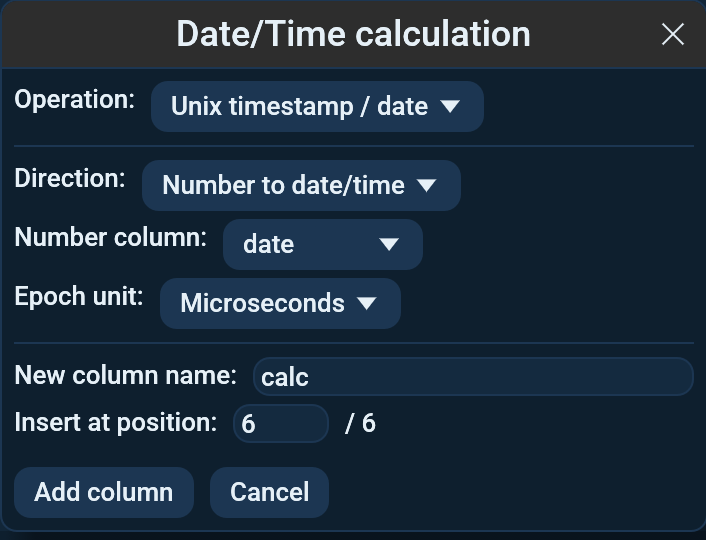
Operations
Pick one of six operations at the top of the dialog. The fields below it change to match.
| Operation | Inputs | Produces |
|---|---|---|
| Difference between two dates | Two date/datetime columns + a result unit | The gap between them, as a number in the chosen unit. |
| Add / subtract time | One date column + an amount + a unit | The date shifted forward (or back) by that amount. |
| Convert duration units | One numeric column + From / To units | The same duration expressed in a different unit. |
| Extract a component | One date column + a component | A single field (year, month, weekday, …) pulled out of the value. |
| Unix timestamp / date | One column + a direction + an epoch unit | A Unix epoch number turned into a date/time, or a date turned into a Unix number. |
| Convert timezone | One date column + From / To zones | The same instant expressed as wall-clock time in another zone. |
Difference between two dates
Choose a First date and a Second date column and a Result
unit. The result is second - first, so a later second date gives a
positive number. Units run from milliseconds up to years:
Milliseconds, Seconds, Minutes, Hours, Days, Months,
Years.
Add / subtract time
Choose a Date column, type an Amount (a whole number, e.g. 7
or -3), and pick a Unit. Negative amounts subtract. Adding months
or years clamps the day to the length of the target month, so
31 Jan + 1 month lands on the last day of February rather than
overflowing into March.
Convert duration units
Choose a Number column holding a duration, then a From and a To unit. Octa rescales each value, e.g. minutes → hours divides by 60.
Extract a component
Choose a Date column and a Component to pull out:
Year, Month, Day, Hour, Minute, Second, or
Weekday (1=Mon..7=Sun).
Unix timestamp / date
Convert between a Unix epoch timestamp (a count since 1970-01-01 00:00:00 UTC) and a readable date/time, in either direction:
- Direction picks which way to convert. Number to date/time reads a numeric column of epoch values and produces a datetime; Date/time to number reads a date column and produces the epoch number.
- Epoch unit is the precision of the number:
Seconds,Milliseconds,Microseconds, orNanoseconds. Pick the one that matches your data, e.g. JavaScriptDate.now()is milliseconds and most database/Unix tooling uses seconds.
The epoch is interpreted in UTC, with no timezone offset applied.
Nanosecond timestamps keep full precision (they are handled as 128-bit
integers, not floats), so a seconds → date → nanoseconds style round
trip is exact.
Convert timezone
Read each datetime as wall-clock time in one zone and write it as
wall-clock time in another. Pick the From zone and To zone from
the full IANA list; the Filter zones box narrows both lists at once,
so typing Berlin or America/ gets you there without scrolling 597
entries.
You have to state the source zone, because Octa cannot detect it.
Datetimes are stored without a timezone, so a value reading
2024-01-15 12:00:00 carries no evidence of which zone it belongs to.
Times that do not exist, or exist twice, are left empty and counted.
Every zone that observes daylight saving has two such moments each year:
the clocks jump forward and an hour never happens, then they jump back
and an hour happens twice. 2024-03-31 02:30 never occurs in
Europe/Berlin, and 2024-10-27 02:30 occurs twice. There is no single
correct answer for either, so Octa refuses to invent one and tells you
how many cells it left empty:
N cells were ambiguous and left empty
How values are read
Date and datetime columns are read directly. Plain-text columns are run through the same date inference parser the table uses, so ISO and common European/US layouts are understood even when the column is still typed as text. Duration conversion reads the source column as a number.
When a cell can't be computed
Cells that aren't valid dates (for the date operations) or aren't valid numbers (for duration conversion) are skipped, and a banner appears above the table:
Date/Time calculation skipped N of M row(s) (cells that aren't valid dates/numbers).
The new column still materialises; skipped rows are left empty. The amount field for Add / subtract time must be a whole number, entering a fraction shows an inline error instead of running.
See also
- Formulas for arithmetic on numeric columns.
- SQL panel for DuckDB date functions, joins, and aggregates.
- Date inference explains how text columns are recognised as dates.
- Editing covers the other column-creating dialogs.