Map view
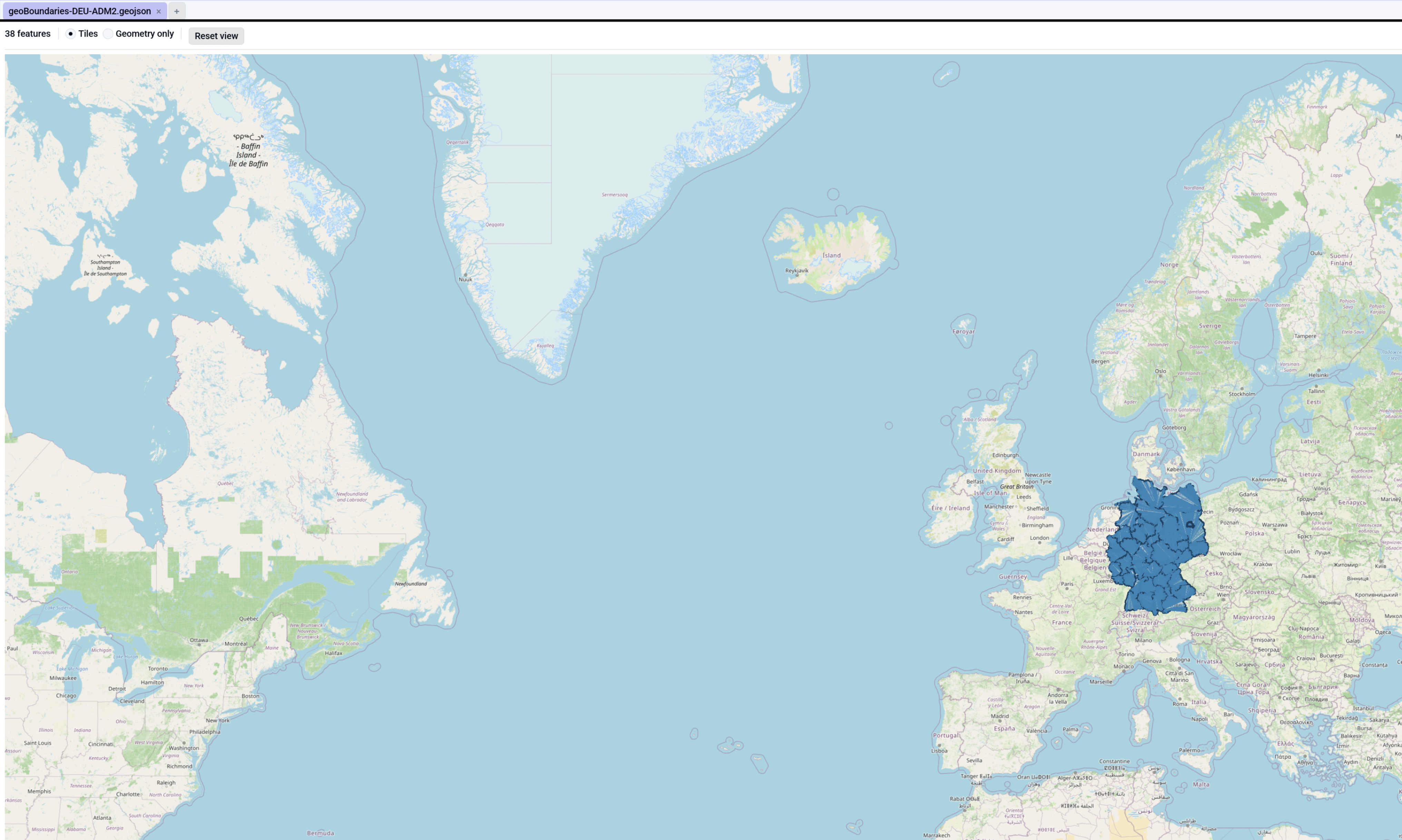
For .geojson files Octa shows a slippy map: OpenStreetMap
tiles in the background, feature geometries painted on top. Pan,
zoom, and switch between tiled and geometry-only rendering.
What you're looking at
Two independent layers, stacked:
- The basemap is OSM raster tiles, covering the whole world at zoom levels 0-19. Walkers (the egui slippy-map widget) fetches the 256×256 PNG tiles for whatever region is visible and stitches them into the background.
- The GeoJSON layer is the feature geometries from your file,
drawn on top via
ui.painter(). GeoJSON is a vector overlay; the basemap is independent.
This means you can pan to Japan even if your GeoJSON describes Germany. The map covers the world; the features are just stamps on top of it.
When the Map view appears
The Map view is the default for .geojson and .shp
(Shapefile) files. The Table view is still
available with one row per Feature, where properties become columns
and the __geometry column holds the feature's geometry as WKT.
Shapefiles read their geometry from the .shp and their attribute
columns from the sibling .dbf, so they plot exactly like GeoJSON.
Plotting any table with coordinates
You don't need GeoJSON to use the map. Open any tabular file
(CSV, Parquet, Excel, ...) that has a latitude and a
longitude column and the View -> Map entry lights up. Octa
recognises columns named lat / latitude and
lon / lng / long / longitude (any case) as long as their
values are numbers in the valid coordinate ranges, and draws one
point per row.
If Octa picks the wrong columns, the Map toolbar shows two small Lat / Lon dropdowns: change either one and the points (and the map centre) update immediately. Rows with a missing or non-numeric coordinate are simply skipped.
Toolbar
- Feature count shows the total number of features in the file.
- Tiles / Geometry only radio:
- Tiles uses the slippy-map background (default).
- Geometry only paints shapes on a blank canvas. Useful offline, or when you want to focus on the data without the map distraction.
- Reset view drops the current pan/zoom and recentres on the feature centroid.
Interaction
- Scroll wheel zooms in / out (plain wheel, no Ctrl needed).
- Double-click zooms in.
- Click-drag pans.
The default view centres on the centroid of every feature's coordinates so you start looking at the data, not at coordinate (0, 0) in the middle of the Atlantic.
Feature rendering
Geometry types and how they paint:
| Geometry type | Renders as |
|---|---|
Point / MultiPoint |
Filled circle (~5 px radius) |
LineString / MultiLineString |
Connected line segments |
Polygon / MultiPolygon |
Filled polygon with outline stroke |
GeometryCollection |
Recurses into members |
Rect / Triangle (rare) |
Treated as polygons |
The default palette is steel blue: a fill at low alpha so polygon interiors don't hide street labels underneath, plus a darker outline and point colour for contrast.
Polygon holes
Polygons with inner rings (holes, the second and subsequent
coordinate arrays in a Polygon definition) are stroked but
not cut out of the fill. egui's painter has no even-odd / winding
fill rule, so a polygon with a hole renders as a filled outer ring
with the hole boundary drawn as an outline. The semantic "this is
a hole" is preserved as a visible boundary, just not as a true
cut-out.
This is a deliberate v1 trade-off documented in the source. If your dataset depends heavily on cut-out rendering (lakes inside countries, etc.), consider visualising in a dedicated GIS tool.
Configurable tile provider
The default tile URL points at OpenStreetMap:
Change it under
Settings → Map → Tile URL template.
The template uses {z}, {x}, {y} placeholders for zoom level
and tile coordinates, so any XYZ-compatible server works.
OSM tile-usage policy
The default URL is fine for personal / development use. For production deployments or sites with non-trivial traffic, please honour the OSM tile-usage policy by pointing at a self-hosted or commercial tile provider (Mapbox, MapTiler, etc.).
An OSM attribution badge is rendered bottom-right when in Tiles mode; clicking it opens the OSM copyright page.
Offline / failed-tile fallback
When the network is down or the tile server is blocked, walkers shows a grey tile grid where the unfetched tiles would be. The geometries still paint correctly on top.
If you'd rather see geometry-only by default in that case, set Settings → Map → Fallback to geometry (on by default). Currently this is advisory; walkers' internal retry mechanism means an outright auto-fallback isn't fully wired in v1. You can always toggle to Geometry only manually from the toolbar.
Table view fallback
Switch to View → Table to see the features as a flat table:
- The leading
__geometrycolumn holds the geometry as WKT, e.g.POINT(13.405 52.52),POLYGON((-5 -5, 5 -5, 0 5, -5 -5)). - Every property key across the feature collection becomes its own
Utf8column (in first-seen order).
This is the lens to use for SQL queries, where
SELECT name, __geometry FROM data WHERE population > 1000000
works as expected.
Limitations
- No editing. Map view is display-only; you can't add / move / delete features.
- No labels yet. Feature properties don't render as labels on the map.
- No clustering. A GeoJSON with 100k point features will render 100k circles.
- WKB / GeoPackage geometries don't open in the Map view. Only
.geojsontriggers it. GeoPackage opens in the Table view with WKB strings.
See also
- Settings → Map changes the default mode, tile URL, and fallback behaviour.
- Supported formats: GeoJSON covers what Octa parses and what it skips.