Batch Convert
Convert many files into one format in a single run: a folder of CSVs into Parquet, a pile of JSON exports into Excel. Available in the GUI, on the command line and through MCP, all three driven by the same engine.
The plan is decided before any work starts, so name collisions and unwritable targets are caught up front rather than halfway through.
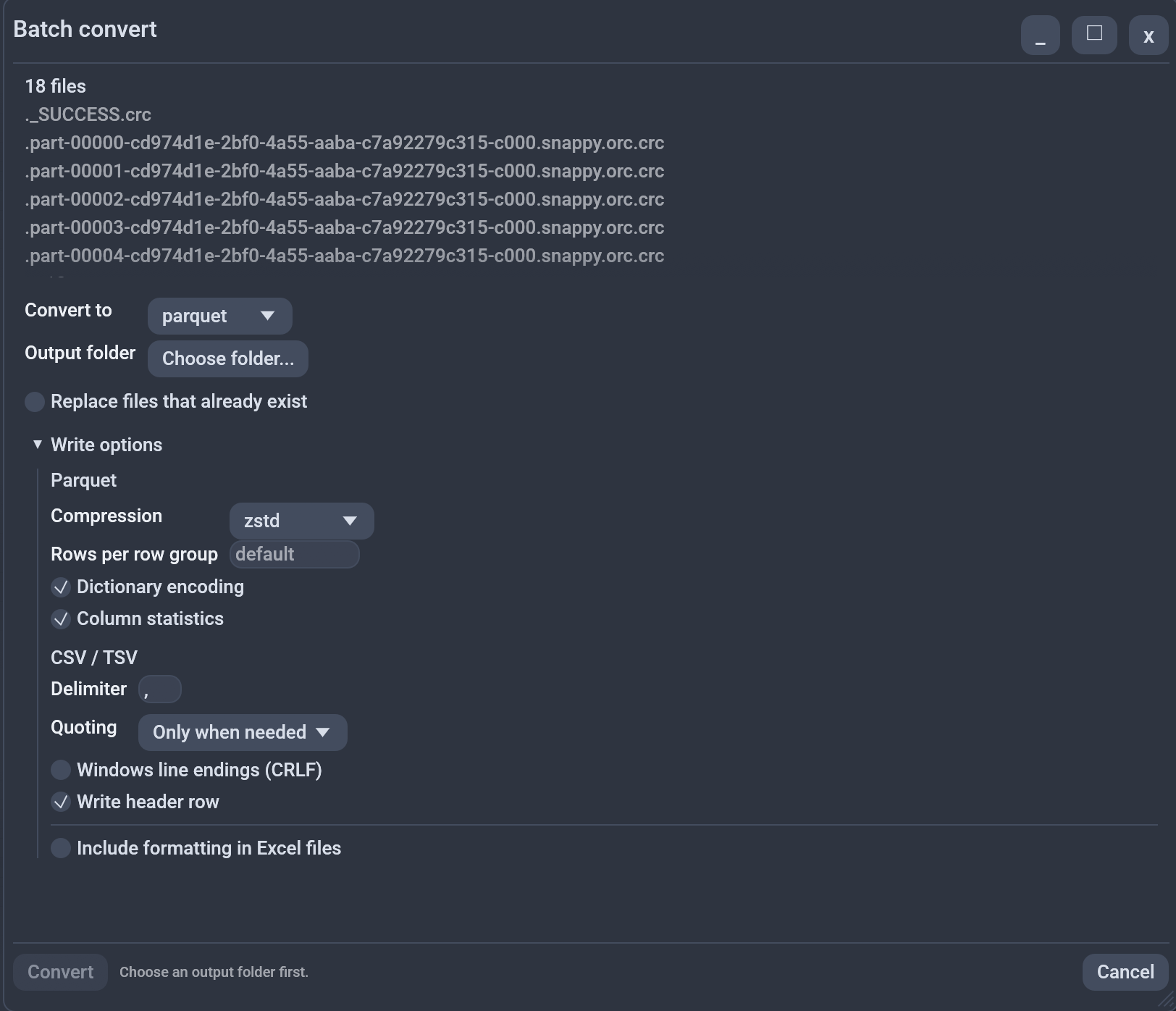
In the GUI
Two ways in:
- From the sidebar: Ctrl-click or Shift-click files in the folder tree, then press Convert... in the selection bar (or right-click a selected file). Works from one file up.
- File → Batch convert...: pick a folder, and every file directly inside it becomes an input.
The dialog shows how many inputs there are, a Convert to dropdown
listing only formats Octa can actually write, an output folder, and a
Replace files that already exist checkbox that is off by default. Tick Protect with password to write
every output inside its own AES-256 zip (a.csv becomes a.csv.zip). Type
the passphrase twice; Convert stays disabled until both match. Only
zips are written, no plain copies.
Conversion runs on a background thread with a live Converting 3 of 12 counter and a Cancel button. When it finishes, a Batch convert report tab opens with one row per file:
| Column | Meaning |
|---|---|
input |
The source path |
output |
Where it was written |
status |
done, failed, skipped or pending |
rows |
Rows written, for successful items |
error |
Why it failed or was skipped |
Cancelling leaves the untouched items as pending, so the report always
says exactly what happened.
Command line
octa --batch-convert --to parquet --out-dir ./out a.csv b.csv c.csv
octa --batch-convert --to json --out-dir ./out --overwrite data/*.csv
| Flag | Required? | Description |
|---|---|---|
--batch-convert |
yes | The action |
--to EXT |
yes | Target extension, no leading dot |
--out-dir DIR |
yes | Output directory, created if absent |
--overwrite |
no | Replace existing outputs (default: skip) |
Stdout is a bare input, output, status listing, tab-separated and
headerless, like --partition-by. Failure detail
and the 2 converted, 1 failed, 0 skipped summary go to stderr, so the
listing stays machine-readable.
The exit code is 1 if any single file failed, so a script can gate on it:
- Command line:
--batch-convert
MCP and the assistant
The batch_convert tool takes inputs, out_dir, to and
overwrite, and returns {converted, failed, skipped, items}. It writes
files, so it is a write tool: removed under --mcp-read-only and
unavailable to a chat profile without Allow writes.
- MCP:
batch_convert
How outputs are named
<out_dir>/<input file stem>.<target extension>. So sales.csv becomes
sales.parquet.
If two inputs would produce the same name, the later ones get _2, _3
and so on in input order. Converting /jan/data.csv and /feb/data.csv
into one folder gives data.parquet and data_2.parquet, never one file
silently overwriting the other.
An output that already exists is skipped, not overwritten, unless you ask for it. That is the safe default for a command that can touch a hundred files at once.
What it will not do
Three deliberate limits:
- Local paths only. Cloud URLs are not accepted; use the cloud tools to fetch first.
- The first table only for multi-table inputs. An Excel workbook with five sheets converts sheet one. Naming outputs for every sheet is a separate decision, not an oversight.
- Sequential. Files convert one at a time. Predictable, cancellable, and never competing with itself for disk.
Gzip and zstd inputs (.csv.gz, .parquet.zst) decompress automatically,
so they need no special handling.
One failed file never stops the run. The rest still convert and the report names what went wrong.
Write options
The dialog has a Write options expander, seeded from Settings and applying to this run only: Parquet compression, rows per row group, dictionary encoding and column statistics; CSV/TSV delimiter, quoting, line endings and header row. Options a target format cannot honour are ignored rather than rejected, since one option set covers the whole batch.
See also
--convertfor a single file.- Partition by Column splits one file into many, the opposite direction.
- Supported formats lists which formats can be written and which are read-only.