Clean-up Suggestions
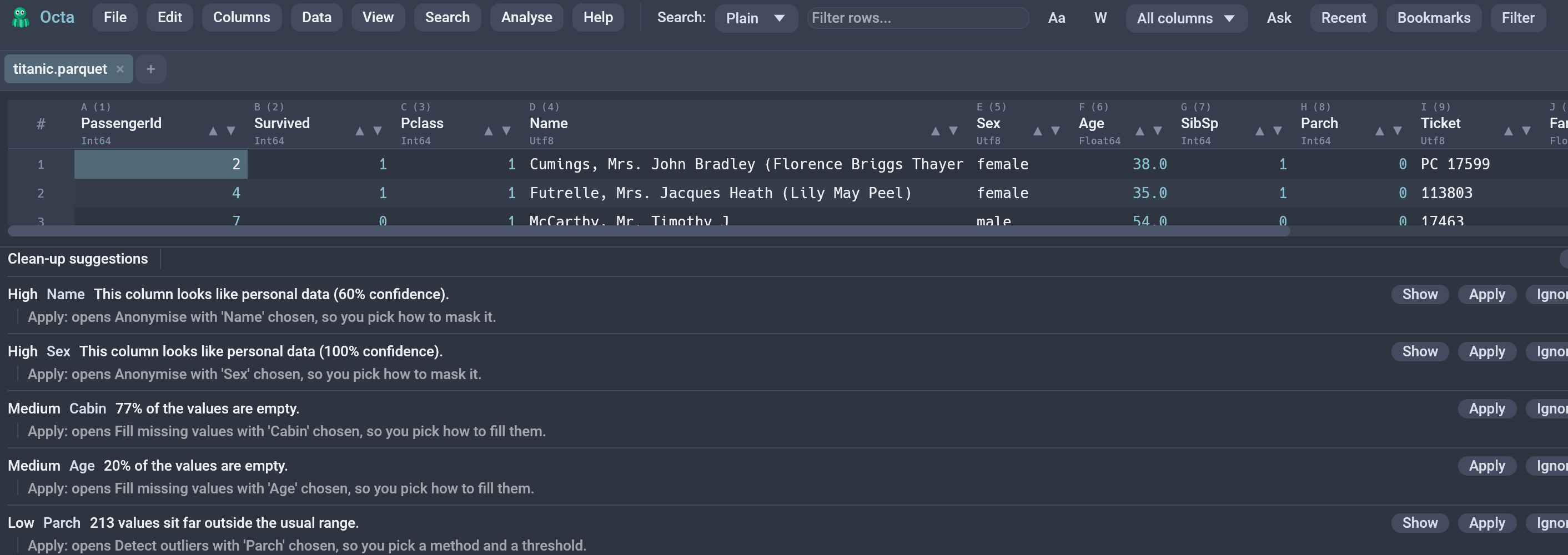
The clean-up panel scans the open table for common data problems and offers a fix for each one. It answers "what is wrong with this file?" in a single pass, instead of making you run six separate checks by hand and remember which ones you have already done.
Opening it
Analyse → Clean-up suggestions. The panel docks at the bottom of the window and can be resized or closed with the x in its header.
There is no setting to switch on. The feature is free until you ask for it, because opening the panel is the only thing that starts a scan.
Scanning
Opening the panel starts the scan, and nothing else does. The scan runs several detection passes over the table, which is not work that should happen behind your back every time you open a file, so it is tied to the one gesture that means "I want to know".
While a scan runs, the header shows a spinner and a Cancel button. The work happens on a background thread against a snapshot of the table, so the window stays responsive and you can keep editing.
Closing and reopening the panel scans again. That is how you refresh the list after editing the table by hand.
The scan examines the first 100,000 rows. On a longer table the
header says Scanned the first 100000 rows. so a count you read in the
panel is never silently based on a partial pass.
Every check reuses the engine the corresponding feature already uses, so the panel and the individual dialogs cannot disagree about what they found.
What it looks for
| Problem | Severity | Fix |
|---|---|---|
| Leading or trailing spaces in a text column | High | Applied directly |
| Garbled characters from a wrong character set | High | Applied directly |
| Whole-row duplicates | High | Applied directly |
| A column that looks like personal data | High | Opens Anonymise |
| A text column whose values are all numbers | Medium | Applied directly |
Numbers wearing a unit: 1.2k, EUR 4,00, 12 kg, 45% |
Medium | Opens Split numbers |
| A column that is 5% or more empty | Medium | Opens Fill missing values |
| A column that is completely empty | Medium | Applied directly |
| Numeric outliers (IQR, k = 1.5) | Low | Opens Detect outliers |
| A column whose every row holds the same value | Low | Applied directly |
| Column titles that are not tidy identifiers | Low | Applied directly |
Results are ranked: highest severity first, then by how many rows or cells the fix would touch, then by column order. Scanning the same unchanged table twice gives the same list in the same order.
A completely empty column is reported as empty, not as "95% missing values". There is nothing to fill it from, so only one of the two ever appears.
Garbled characters
Text that was read with the wrong character set and then saved as valid
UTF-8: Müller where Müller belongs, ’ where an apostrophe
belongs. Once the file is saved this way the bytes are perfectly legal
UTF-8, so nothing flags them on load and every tool downstream
reproduces the mess faithfully.
Octa repairs a cell only when it can prove the repair: it encodes the text back to the single-byte form it must have come from, decodes that as UTF-8, and accepts the result only if it decodes cleanly and no corruption signature remains. Cells that fail any of those checks are left exactly as they are. A confident wrong "repair" would be worse than the corruption, so the engine refuses rather than guesses.
Only the common Windows-1252 and Latin-1 cases are covered. Text that was corrupted twice, or corrupted lossily, is reported but not repaired.
Columns that hold one value
A column where every row says EU separates nothing: a filter over it answers
the same thing every time, and a group-by returns one group. Octa suggests
dropping it.
Nulls do not count as the value. A column of 900 active and 100 empties
is a column with missing values, not a constant one, and dropping it would
throw away the fact that some rows had nothing. Those get the missing-values
suggestion instead. A single-row table is not reported either, since every
column of one row is constant by accident.
Numbers wearing a unit
1.2k, EUR 4,00, 12 kg, 45% are text to every reader, so they sort
alphabetically, refuse to sum, and quietly poison any average taken over them.
Octa reports a column when at least 80% of its values split this way, and at
least three of them do.
Clicking the suggestion opens Split numbers from units, which changes nothing until you press Apply and offers three answers, defaulting to the one that changes nothing:
- Leave as text.
- Add a number column beside the original.
- Add a number column and a unit column.
The original column is never touched, so the value as it was written stays in the file. Both new columns arrive in one undo step, so a single Ctrl+Z takes the split back.
Three details worth knowing:
- A magnitude suffix is folded into the number.
1.2kbecomes1200, and the unit column is empty, because1.2kis a number rather than a number of anything. - A percentage keeps its number.
45%becomes45, not0.45. Turning one into the other is a change of meaning, and nothing here changes meanings. - The decimal convention is decided over the whole column, not per value.
$1,200on its own is genuinely undecidable: twelve hundred dollars in Ohio, one euro twenty in Bavaria. A column of them usually settles it, and getting it wrong would be wrong by a factor of a thousand. If the column mixes units, the dialog says so, because that is exactly the column nobody should sum.
Seeing the evidence
Most suggestions carry a Show button listing up to three of the real offending values, so you can check what the suggestion actually means before changing anything:
| Suggestion | Example shows |
|---|---|
| Leading / trailing spaces | The values, quoted: "Tokyo ", " Bonn" |
| Numbers stored as text | The first few values: 1024, 2048 |
| Duplicate rows | The repeated rows, as a \| b \| c |
| Outliers | The outlying values themselves |
| Personal data | The first few values in the column |
| Untidy titles | The rename: Order ID -> order_id |
| Numbers with a unit | The first few values: 12 kg, 3 kg |
| One value all the way down | The value itself: EU |
Whitespace examples are quoted because a trailing space is otherwise invisible on screen, which is the whole reason that problem is easy to miss. Long values are cut at 60 characters.
Suggestions with nothing to show get no button: an empty cell and an empty column have no value worth printing. The examples are picked deterministically, so rescanning unchanged data shows the same ones.
Applying a fix
Under every suggestion is a line stating what Apply would do to this table, with the real column name and count filled in:
Apply: remove the spaces around 12 values in 'city'. Undo with Ctrl+Z.
Apply: delete 3 repeated rows, keeping the first of each. Undo with Ctrl+Z.
Apply: opens Fill missing values with 'notes' chosen, so you pick how to fill them.
That line is always visible, not a tooltip. A button whose effect you have to click to discover is a gamble, and the two classes below are the whole design of the panel, so the sentence says outright which one you are about to get: the direct fixes end by naming undo, the deferred ones name the dialog that opens.
Each row carries Apply and Ignore.
Ignore hides that one suggestion until the next scan. Nothing is remembered between runs, and nothing is written to disk.
Apply splits into two kinds, and that split is the point of the feature:
- Unambiguous fixes apply straight away. They run through the same code path the manual menu entry runs, which means each one is undoable with a single Ctrl+Z even when it changed thousands of cells. This covers trimming a column, casting a text column to numbers, dropping an empty column, tidying the column titles, and dropping duplicate rows.
- Fixes that need a decision open the matching dialog, pre-filled with the column in question. Filling missing values needs a strategy, detecting outliers needs a method and a threshold, and anonymising needs an algorithm and possibly a salt. The panel will not guess these for you, and it does not reimplement any of those dialogs.
Applying a direct fix rescans automatically. It has to: dropping a column shifts the numbering that every later suggestion refers to, so carrying on with the old list would point some of them at the wrong column.
Apply is disabled while read-only mode (F8) is active.
Keyboard shortcut
The OpenCleanupPanel action ships unbound because every
Ctrl+Shift+<letter> combination is already taken. Assign one under
Settings → Shortcuts if you want it.
See also
- Data Quality Report is the read-only companion: a full per-column report rather than a ranked list of fixes.
- Detect PII scans for personal data on its own, with more detail per column.
- Clean headers on load applies the tidy-titles fix automatically to every file you open.