Column Inspector
A read-only, schema-at-a-glance modal that lists every column in the active table with its data type and a few quick statistics: numeric min and max, whether the column contains nulls, and whether all values are unique. Useful for sanity-checking a freshly loaded file before running queries or edits against it.
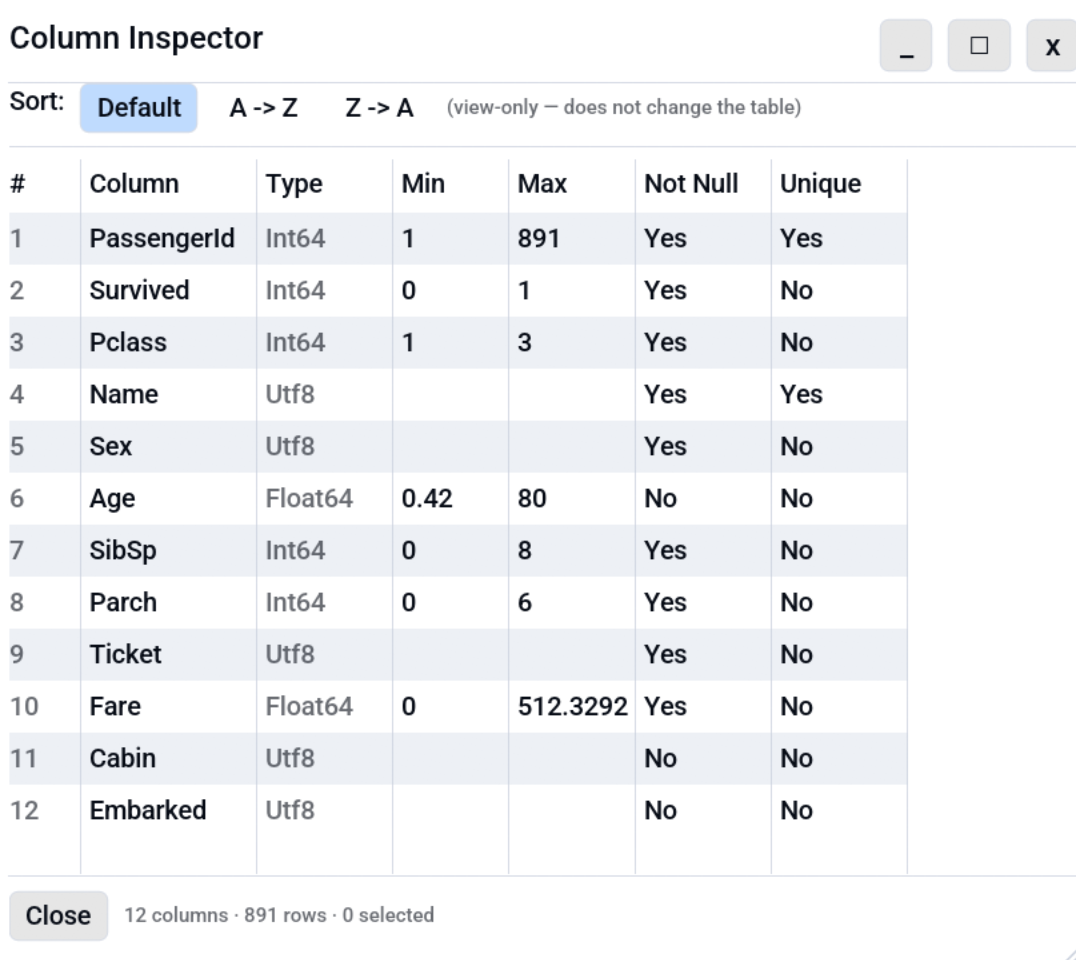
Opening the inspector
- Keyboard shortcut: Ctrl+I (remappable under Settings, Shortcuts).
- Menu: Edit, Column Inspector....
Columns in the dialog
| Column | Meaning |
|---|---|
| # | Original column index in the table. |
| Name | Column name as stored in the file. |
| Type | Octa's display type (Utf8, Int64, Float64, Date, ...). |
| Min / Max | Numeric min and max for numeric columns; blank otherwise. |
| Nulls | Whether the column contains any null values or empty strings. |
| Unique | Whether every non-null value is distinct. Useful for spotting natural keys. |
Empty columns (all null) report Unique: No to avoid a misleading "yes" on a column that has nothing to be unique about.
Sorting
Inside the inspector toolbar, switch between Default (the original column order), A -> Z, and Z -> A. The sort applies only to the inspector view; it does not reorder columns in the underlying table. To permanently reorder columns, drag a column header in the main table view, or use Edit, Sort Columns A -> Z / Z -> A.
Selecting and copying
- Click a row to select it.
- Ctrl+click adds rows to the selection; Shift+click picks a contiguous range.
- Ctrl+A selects every column listed.
- Ctrl+C copies the selected rows as TSV
(one line per row, columns
#\tName\tType\tMin\tMax\tNulls\tUnique).
See also
- Value Frequency:
df.value_counts()for one column at a time, including optional numeric binning. Reachable from the column-header right-click menu or via Ctrl+Shift+I.